Intent of Employee User Permissions
In any organization, it is essential to implement user permission restrictions to ensure that employees have access only to their own personal records—such as personal information, salary details, leave balances, and other confidential data.
Restricting access is essential to safeguarding sensitive employee information. Personal details like contact information, salary, leave history, and performance evaluations must be shielded from unauthorized access or misuse. By ensuring that employees can only view their own data, organizations uphold privacy standards and protect the confidentiality of all personnel.
To set up user permissions for employee, follow the steps outlined below:
- Go to: User Permissions doctype. Click on "Add User Permission"

- Fill the fields as follows:
a. User: Select the user (employee).
b. Allow: Select Employee.
c. For Value: Choose the employee's own record.
d. Checked "Apply to All Doctypes" field .
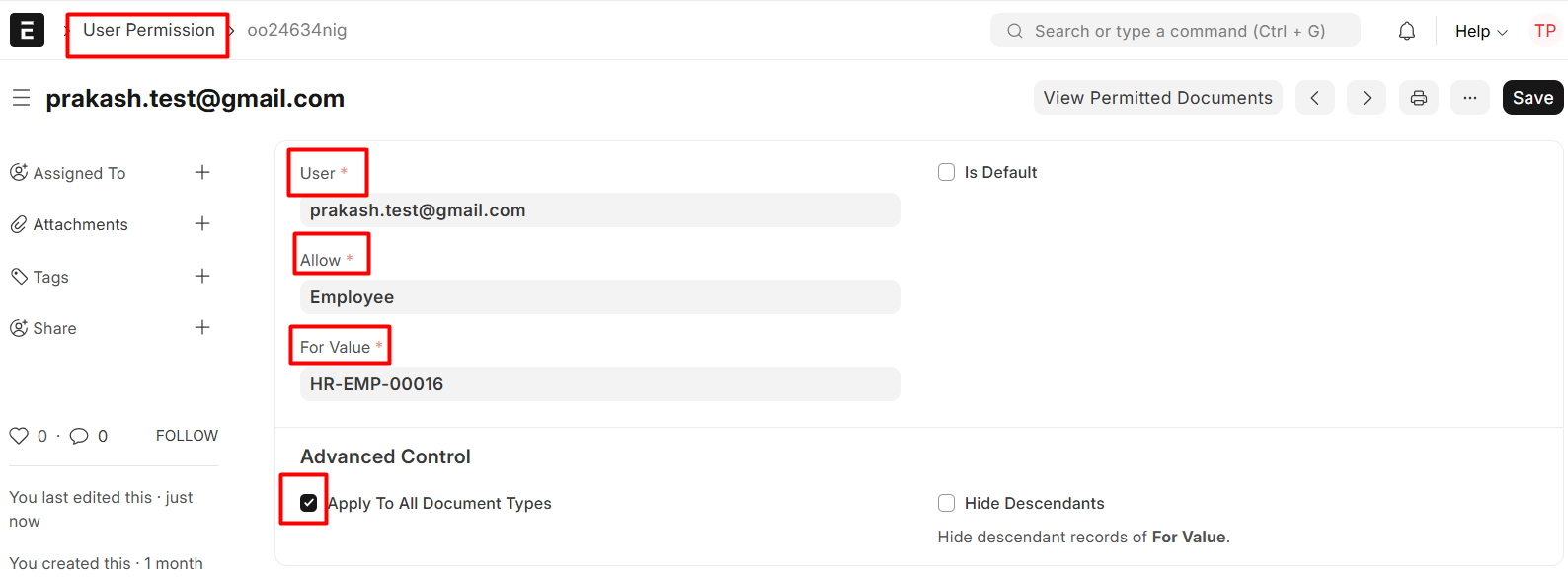 This step ensures that the user can only interact with documents related to their own Employee ID.
To verify whether there are any existing employees without user permission restrictions, for that you need to generate a report "Employee Existing without permission" by following steps:
Navigate to the Report doctype and click the "Add Report" button at the top right.
- Report Name: Employee Existing without permission
- Report Type (choose “Query Report”)
- Ref DocType: User Permission
- Add Columns: employee_name and user_id
- Add your SQL query in the "Query" field
select te.employee_name ,
te.user_id fromtabEmployeete
inner join tabUser tu on
te.user_id= tu.name
where te.user_id not in
(select distinct user
fromtabUser Permission
where allow="Employee") - Save the report.
Navigate to the Employee Not Having User Restrictions report and configure the auto-email report based on user permissions. Compose an appropriate message to include in the email.
You can use this report to set up an automated email notification (as above mentioned) to help ensure that no employee is mistakenly granted access to another employee's data or records.