Company Wise Internal - Transfer
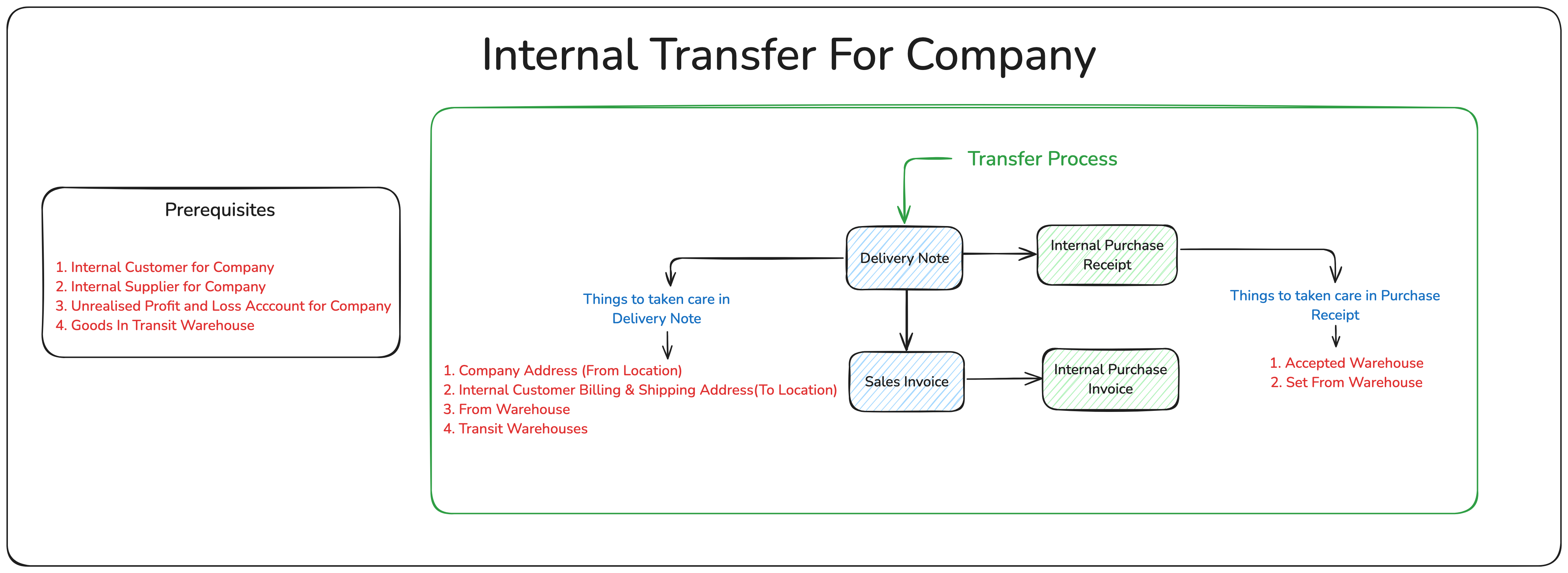
Company Wise Internal - Transfer
reeta edited 2 years ago
Material Transfer from Delivery Note Scenarios:
One of the examples is when you transfer a Material from your stores to project site, however, you need to present it as a Delivery Note to the client.
Also, there are statutory requirements where taxes are to be applied on each transfer of Material. It is easier to manage in a transaction like Delivery Note, than in the Stock Entry.
Considering these scenarios, the provision of Material Transfer has been added in the Delivery Note as well. Following are the steps to use Delivery Note for creating Material Transfer entry.
Steps:
Enable Target Warehouse Delivery Note Item doctype has a hidden field of Target Warehouse (previously Customer Warehouse). You can enable it from Stock Settings by enabling "Allow Material Transfer From Delivery Note and Sales Invoice".
Also note that the selected customer should represent the same company. For this, enable the 'Is Internal Customer' option in the customer form and select your company in the 'Represents Company' field.
Select Warehouses
When creating a Delivery Note for Material Transfer, for an item select source Warehouse as From Warehouse.
In the Customer Warehouse, select a Warehouse where Material is to be transferred or select a target warehouse.
On the submission of a Delivery Note, item's stock will be deducted from "From Warehouse" and added to the "Customer Warehouse".